HAProxy -aaa- Konfiguration
Active-Active-Active HAProxy Konfiguration mit Openstack
Konzept
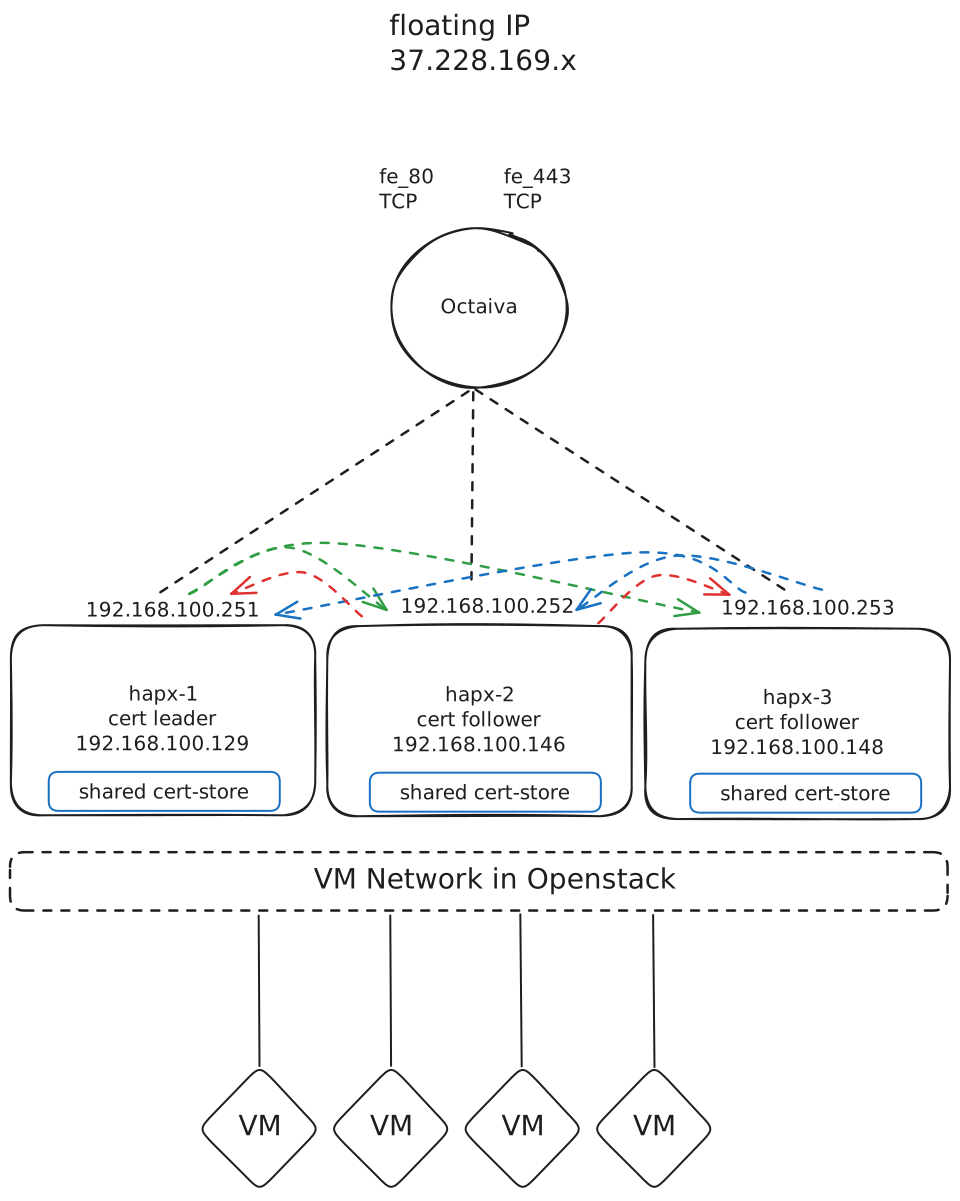
Vorgehen & Vorraussetzungen
Software
HAProxy 3.2
biete einen ACME Support nativ an
Keepalived
Openstack
Octavia (Loadbalancer)
Nova (VMs)
Openstack Runbook
Octavia Setup
TCP Loadbalancer vor den HAProxys
# Variablen
LB_NAME=loadbalancer-1
VIP_SUBNET_ID="3188133b-d42a-4216-af89-2fe87616e827"
BACKEND_SUBNET_ID="277ac2e6-79ed-4725-98f8-b3e4ad7e6f8d"

LISTENER_80=fe_80
LISTENER_443=fe_443
POOL_80=pool_fe_80
POOL_443=pool_fe_443
HM_80=hm_fe_80
HM_443=hm_fe_443

# 1) Loadbalancer (VIP) anlegen
openstack loadbalancer create --name "$LB_NAME" --vip-subnet-id "$VIP_SUBNET_ID"

# 2) Listener (beide TCP-Frontends)
openstack loadbalancer listener create \
  --name "$LISTENER_80" --protocol TCP --protocol-port 80 "$LB_NAME"

openstack loadbalancer listener create \
  --name "$LISTENER_443" --protocol TCP --protocol-port 443 "$LB_NAME"

# 3) Pools (je Listener einen, TCP/SOURCE_IP)
openstack loadbalancer pool create \
  --name "$POOL_80" --protocol TCP --lb-algorithm SOURCE_IP --listener "$LISTENER_80"

openstack loadbalancer pool create \
  --name "$POOL_443" --protocol TCP --lb-algorithm SOURCE_IP --listener "$LISTENER_443"

# 4) Member in die Pools aufnehmen
# Pool 80
openstack loadbalancer member create "$POOL_80" \
  --subnet-id "$BACKEND_SUBNET_ID" --address 192.168.100.251 --protocol-port 80 --name m80_251
openstack loadbalancer member create "$POOL_80" \
  --subnet-id "$BACKEND_SUBNET_ID" --address 192.168.100.252 --protocol-port 80 --name m80_252
openstack loadbalancer member create "$POOL_80" \
  --subnet-id "$BACKEND_SUBNET_ID" --address 192.168.100.253 --protocol-port 80 --name m80_253

# Pool 443
openstack loadbalancer member create "$POOL_443" \
  --subnet-id "$BACKEND_SUBNET_ID" --address 192.168.100.251 --protocol-port 443 --name m443_251
openstack loadbalancer member create "$POOL_443" \
  --subnet-id "$BACKEND_SUBNET_ID" --address 192.168.100.252 --protocol-port 443 --name m443_252
openstack loadbalancer member create "$POOL_443" \
  --subnet-id "$BACKEND_SUBNET_ID" --address 192.168.100.253 --protocol-port 443 --name m443_253

# 5) Health Checks (nur Ping/ICMP auf die Member-IPs)
openstack loadbalancer healthmonitor create "$POOL_80" \
  --name "$HM_80" --type PING --delay 5 --timeout 3 --max-retries 3

openstack loadbalancer healthmonitor create "$POOL_443" \
  --name "$HM_443" --type PING --delay 5 --timeout 3 --max-retries 3

# 6) Statusübersicht

openstack loadbalancer list
+--------------------------------------+----------------+----------------------------------+-----------------+---------------------+------------------+----------+
| id                                   | name           | project_id                       | vip_address     | provisioning_status | operating_status | provider |
+--------------------------------------+----------------+----------------------------------+-----------------+---------------------+------------------+----------+
| 2e07893c-e0c3-4d15-9aee-fac927f05827 | loadbalancer_1 | 9514d9a60e4847498b7c51a050808c74 | 192.168.100.149 | ACTIVE              | ERROR            | amphora  |
+--------------------------------------+----------------+----------------------------------+-----------------+---------------------+------------------+----------+

openstack loadbalancer show 2e07893c-e0c3-4d15-9aee-fac927f05827
+---------------------+--------------------------------------+
| Field               | Value                                |
+---------------------+--------------------------------------+
| admin_state_up      | True                                 |
| availability_zone   | None                                 |
| created_at          | 2025-09-13T14:35:01                  |
| description         |                                      |
| flavor_id           | 406a7541-620d-4bdf-b47f-90efc8f52a69 |
| id                  | 2e07893c-e0c3-4d15-9aee-fac927f05827 |
| listeners           | 44de30bd-ea8e-45a1-a148-1a770b584c42 |
|                     | ca9da044-8a99-4616-867f-99124453dabd |
| name                | loadbalancer_1                       |
| operating_status    | ERROR                                |
| pools               | 0b43985a-9ec1-4b80-8c12-4a341124aa1a |
|                     | ca30ec39-5555-4075-97c8-19e0deafc911 |
| project_id          | 9514d9a60e4847498b7c51a050808c74     |
| provider            | amphora                              |
| provisioning_status | ACTIVE                               |
| updated_at          | 2025-09-13T15:45:18                  |
| vip_address         | 192.168.100.149                      |
| vip_network_id      | 277ac2e6-79ed-4725-98f8-b3e4ad7e6f8d |
| vip_port_id         | aef48293-3955-4179-8ce8-f6632e68f1ae |
| vip_qos_policy_id   | None                                 |
| vip_subnet_id       | f6a5db8f-9fb1-491c-8cc1-68499d030da4 |
| vip_vnic_type       | normal                               |
| vip_sg_ids          |                                      |
| tags                | None                                 |
| additional_vips     |                                      |
+---------------------+--------------------------------------+

openstack floating ip list
+--------------------------------------+---------------------+------------------+--------------------------------------+--------------------------------------+----------------------------------+
| ID                                   | Floating IP Address | Fixed IP Address | Port                                 | Floating Network                     | Project                          |
+--------------------------------------+---------------------+------------------+--------------------------------------+--------------------------------------+----------------------------------+
| 27c02b1c-c33c-4141-a1be-d54e8bf8c928 | 37.228.169.xx       | 192.168.36.223   | 0d14cd20-2322-4fec-b9d1-76f62ffff0b6 | 3188133b-d42a-4216-af89-2fe87616e827 | 9514d9a60e4847498b7c51a050808c74 |
| 87dc29d8-01c1-4a14-80b0-82563f0ac0f3 | 37.228.169.xx       | 192.168.100.149  | aef48293-3955-4179-8ce8-f6632e68f1ae | 3188133b-d42a-4216-af89-2fe87616e827 | 9514d9a60e4847498b7c51a050808c74 |
| d14aa13f-9efd-4671-8ed8-0500d47903f9 | 37.228.168.xx       | None             | None                                 | 3188133b-d42a-4216-af89-2fe87616e827 | 9514d9a60e4847498b7c51a050808c74 |
+--------------------------------------+---------------------+------------------+--------------------------------------+--------------------------------------+----------------------------------+

# 7) adding floating ip
openstack floating ip set --port aef48293-3955-4179-8ce8-f6632e68f1ae 87dc29d8-01c1-4a14-80b0-82563f0ac0f3
VIPs & Allowed Address Pairs
VRRP-IPs Ports erstellen
NETWORK_ID="277ac2e6-79ed-4725-98f8-b3e4ad7e6f8d"
IMAGE_ID="eab7e278-58af-4922-a6f5-85c272de9738"
SSH_KEY="ssh-key-opencloud"
FLAVOR_ID="SCS-2V-4"
SEC_ID="44c51350-c5cc-4054-9112-d3fc8bebd25c"
ALLOWD_ADDR1="192.168.100.251"
ALLOWD_ADDR2="192.168.100.252"
ALLOWD_ADDR3="192.168.100.253"
SRV1="hapx-1"
SRV2="hapx-2"
SRV3="hapx-3"
openstack port create hapx-1-vrrp --network $NETWORK_ID --fixed-ip ip-address=$ALLOWD_ADDR1
openstack port create hapx-2-vrrp --network $NETWORK_ID --fixed-ip ip-address=$ALLOWD_ADDR2
openstack port create hapx-3-vrrp --network $NETWORK_ID --fixed-ip ip-address=$ALLOWD_ADDR3VMs erstellen
Einzeiler mit Subshell
openstack server create $SRV1 \
  --availability-zone A \
  --flavor $FLAVOR_ID \
  --nic port-id=$(openstack port create \
    --network $NETWORK_ID \
    --description $SRV1 \
    --dns-name $SRV1 \
    --allowed-address ip-address=$ALLOWD_ADDR1 \
    --allowed-address ip-address=$ALLOWD_ADDR2 \
    --allowed-address ip-address=$ALLOWD_ADDR3 \
    -f value -c id \
    $SRV1 ) \
  --image $IMAGE_ID \
  --boot-from-volume 20 \
  --key-name $SSH_KEY \
  --security-group $SEC_ID

openstack server create $SRV2 \
  --availability-zone B \
  --flavor $FLAVOR_ID \
  --nic port-id=$(openstack port create \
    --network $NETWORK_ID \
    --description $SRV2 \
    --dns-name $SRV2 \
    --allowed-address ip-address=$ALLOWD_ADDR1 \
    --allowed-address ip-address=$ALLOWD_ADDR2 \
    --allowed-address ip-address=$ALLOWD_ADDR3 \
    -f value -c id \
    $SRV2 ) \
  --image $IMAGE_ID \
  --boot-from-volume 20 \
  --key-name $SSH_KEY \
  --security-group $SEC_ID

openstack server create $SRV3 \
  --availability-zone C \
  --flavor $FLAVOR_ID \
  --nic port-id=$(openstack port create \
    --network $NETWORK_ID \
    --description $SRV3 \
    --dns-name $SRV3 \
    --allowed-address ip-address=$ALLOWD_ADDR1 \
    --allowed-address ip-address=$ALLOWD_ADDR2 \
    --allowed-address ip-address=$ALLOWD_ADDR3 \
    -f value -c id \
    $SRV3 ) \
  --image $IMAGE_ID \
  --boot-from-volume 20 \
  --key-name $SSH_KEY \
  --security-group $SEC_ID
Ceph Volume erstellen
openstack volume create --size 10 hapx-1_data
openstack server add volume hapx-1 hapx-1_data

openstack volume create --size 10 hapx-2_data
openstack server add volume hapx-2 hapx-2_data

openstack volume create --size 10 hapx-3_data
openstack server add volume hapx-3 hapx-3_data
Keepalived Konfiguraiton
🛠 hapx-1
vrrp_script chk_haproxy {
    script "pidof haproxy"
    interval 2
    weight -20
}

vrrp_instance VI_251 {
    state MASTER
    interface ens3
    virtual_router_id 51
    priority 150
    advert_int 1

    authentication {
        auth_type PASS
        auth_pass supergeheim
    }

    virtual_ipaddress {
        192.168.100.251
    }

    garp_master_delay 1
    garp_master_repeat 5
    garp_master_refresh 10

    track_script {
        chk_haproxy
    }
}

vrrp_instance VI_252 {
    state BACKUP
    interface ens3
    virtual_router_id 52
    priority 120
    advert_int 1

    authentication {
        auth_type PASS
        auth_pass supergeheim
    }

    virtual_ipaddress {
        192.168.100.252
    }

    garp_master_delay 1
    garp_master_repeat 5
    garp_master_refresh 10

    track_script {
        chk_haproxy
    }
}

vrrp_instance VI_253 {
    state BACKUP
    interface ens3
    virtual_router_id 53
    priority 120
    advert_int 1

    authentication {
        auth_type PASS
        auth_pass supergeheim
    }

    virtual_ipaddress {
        192.168.100.253
    }

    garp_master_delay 1
    garp_master_repeat 5
    garp_master_refresh 10

    track_script {
        chk_haproxy
    }
}
🛠 hapx-2
vrrp_script chk_haproxy {
    script "pidof haproxy"
    interval 2
    weight -20
}

vrrp_instance VI_251 {
    state BACKUP
    interface ens3
    virtual_router_id 51
    priority 120
    advert_int 1

    authentication {
        auth_type PASS
        auth_pass supergeheim
    }

    virtual_ipaddress {
        192.168.100.251
    }

    garp_master_delay 1
    garp_master_repeat 5
    garp_master_refresh 10

    track_script {
        chk_haproxy
    }
}

vrrp_instance VI_252 {
    state MASTER
    interface ens3
    virtual_router_id 52
    priority 150
    advert_int 1

    authentication {
        auth_type PASS
        auth_pass supergeheim
    }

    virtual_ipaddress {
        192.168.100.252
    }

    garp_master_delay 1
    garp_master_repeat 5
    garp_master_refresh 10

    track_script {
        chk_haproxy
    }
}

vrrp_instance VI_253 {
    state BACKUP
    interface ens3
    virtual_router_id 53
    priority 120
    advert_int 1

    authentication {
        auth_type PASS
        auth_pass supergeheim
    }

    virtual_ipaddress {
        192.168.100.253
    }

    garp_master_delay 1
    garp_master_repeat 5
    garp_master_refresh 10

    track_script {
        chk_haproxy
    }
}
🛠 hapx-3
vrrp_script chk_haproxy {
    script "pidof haproxy"
    interval 2
    weight -20
}

vrrp_instance VI_251 {
    state BACKUP
    interface ens3
    virtual_router_id 51
    priority 120
    advert_int 1

    authentication {
        auth_type PASS
        auth_pass supergeheim
    }

    virtual_ipaddress {
        192.168.100.251
    }

    garp_master_delay 1
    garp_master_repeat 5
    garp_master_refresh 10

    track_script {
        chk_haproxy
    }
}

vrrp_instance VI_252 {
    state BACKUP
    interface ens3
    virtual_router_id 52
    priority 120
    advert_int 1

    authentication {
        auth_type PASS
        auth_pass supergeheim
    }

    virtual_ipaddress {
        192.168.100.252
    }

    garp_master_delay 1
    garp_master_repeat 5
    garp_master_refresh 10

    track_script {
        chk_haproxy
    }
}

vrrp_instance VI_253 {
    state MASTER
    interface ens3
    virtual_router_id 53
    priority 150
    advert_int 1

    authentication {
        auth_type PASS
        auth_pass supergeheim
    }

    virtual_ipaddress {
        192.168.100.253
    }

    garp_master_delay 1
    garp_master_repeat 5
    garp_master_refresh 10

    track_script {
        chk_haproxy
    }
}
GARP: Die gesetzten garp_* sorgen für schnelles Umlernen der MAC-Zuordnung bei Masterwechsel.
Preemption: Standardmäßig „preemptiv“ – d. h. ein Node holt sich „seine“ VIP zurück, wenn er wieder aktiv ist.
Microceph
Als gemeinsamer cert-store wird /mnt/ceph/certs verwendet, dass über ein microceph multi-node realisiert wird. Bei Openstack sollte ein weiteres Volume für Ceph hinzugefügt werden.
HAProxy Konfiguration
1) HAProxy Installieren
sudo add-apt-repository ppa:vbernat/haproxy-3.2
sudo apt update && sudo apt install haproxy keepalived -y
sudo systemctl stop haproxy.service
Server:
hapx-1 - 192.168.100.135
hapx-2 - 192.168.100.114
hapx-3 - 192.168.100.103
VRRP VIPs:
192.168.100.251
192.168.100.252
192.168.100.253
werden in einem weitern Schritt in Openstack angelegt
Damit HAProxy starten kann brauchen wir ein placeholder Zertifkat. Wenn HAProxy damit gestartet wurde, können die Lets-Encrypt Zertifkate angefordert werden
2) Placeholder Zertifkat erstellen
sudo chmod 750 /mnt/ceph/certs
openssl req -x509 -newkey ec -pkeyopt ec_paramgen_curve:P-256 -nodes \
  -subj "/CN=placeholder.local" -days 1 \
  -keyout /mnt/ceph/certs/placeholder.key \
  -out    /mnt/ceph/certs/placeholder.pem
cat /mnt/ceph/certs/placeholder.key >> /mnt/ceph/certs/placeholder.pem
bis unsere Zertifkate ausgestellt sind, müssen auch die Zertifkate für unsere Webserver exisiteren
cp /mnt/ceph/certs/placeholder.pem /mnt/ceph/certs/web1.36px.de.pem
cp /mnt/ceph/certs/placeholder.pem /mnt/ceph/certs/web2.36px.de.pem
cp /mnt/ceph/certs/placeholder.pem /mnt/ceph/certs/web3.36px.de.pem
sudo chgrp haproxy /mnt/ceph/certs/*.pem
3) HAProxy Files
Dateien auf den Hosts verteilen. HAProxy auf den followern nicht starten.
🛠 HAProxy Konfiguration (leader) /etc/haproxy/haproxy.cfg
global
  log /dev/log local0
  log /dev/log local1 notice
  daemon
  maxconn 50000

  # ACME in 3.2 ist (noch) EXPERIMENTELL – diese Zeile ist Pflicht
  expose-experimental-directives
  # ACME-Scheduler (Standard: auto)
  acme.scheduler auto

  # Moderne TLS-Defaults
  ssl-default-bind-options ssl-min-ver TLSv1.2 no-tls-tickets
  ssl-default-bind-ciphers ECDHE-ECDSA-AES256-GCM-SHA384:ECDHE-RSA-AES256-GCM-SHA384:ECDHE-ECDSA-CHACHA20-POLY1305:ECDHE-RSA-CHACHA20-POLY1305:ECDHE-ECDSA-AES128-GCM-SHA256:ECDHE-RSA-AES128-GCM-SHA256
  ssl-default-bind-ciphersuites TLS_AES_256_GCM_SHA384:TLS_CHACHA20_POLY1305_SHA256:TLS_AES_128_GCM_SHA256
  ssl-default-bind-curves X25519:P-256

  # Für ACME-Abfragen empfiehlt HAProxy ggf. IPv4 zu bevorzugen
  httpclient.resolvers.prefer ipv4

  # Runtime/Stats-Socket (für ACME „dump ssl cert“)
  stats socket /var/run/haproxy.sock mode 660 level admin

defaults
  mode http
  log global
  option httplog
  option dontlognull
  timeout connect 5s
  timeout client  30s
  timeout server  30s
  option forwardfor

# ---------- Frontends ----------
# Port 80 (HTTP): ACME-Challenges beantworten, sonst Redirect auf HTTPS
frontend fe_http
  bind :80
  mode http

  http-request return status 200 content-type text/plain lf-string "%[path,field(-1,/)].%[path,field(-1,/),map(virt@acme)]\n" if { path_beg "/.well-known/acme-challenge/" }

  # Sonst alles auf HTTPS umleiten
  http-request redirect scheme https code 301 unless { path_beg "/.well-known/acme-challenge/" }

# Port 443 (HTTPS): TLS, HTTP/2 und Host-basiertes Routing
frontend fe_https
  mode http
  bind :443 ssl alpn h2,http/1.1 default-crt /mnt/ceph/certs/placeholder.pem

  # ACME: Zertifikate pro Domain verknüpfen (Platzhalter-PEMs beim Start vorhanden)
  # 'ssl-f-use' weist der Bindung Zertifikate zu und koppelt sie an ACME. :contentReference[oaicite:2]{index=2}
  ssl-f-use crt "/mnt/ceph/certs/web1.36px.de.pem" acme LE domains "web1.36px.de"
  ssl-f-use crt "/mnt/ceph/certs/web2.36px.de.pem" acme LE domains "web2.36px.de"
  ssl-f-use crt "/mnt/ceph/certs/web3.36px.de.pem" acme LE domains "web3.36px.de"

  # Host-basierte Weiterleitung
  use_backend be_web1 if { hdr(host) -i web1.36px.de }
  use_backend be_web2 if { hdr(host) -i web2.36px.de }
  use_backend be_web3 if { hdr(host) -i web3.36px.de }

  http-response set-header Strict-Transport-Security "max-age=31536000; includeSubDomains; preload"

# ---------- Backends ----------
backend be_web1
  mode http
  server web1 192.168.100.131:80 check inter 2s fall 3 rise 2

backend be_web2
  mode http
  server web2 192.168.100.127:80 check inter 2s fall 3 rise 2

backend be_web3
  mode http
  server web3 192.168.100.121:80 check inter 2s fall 3 rise 2

# ---------- ACME-Konfiguration ----------
acme LE
  #PRD
  # directory https://acme-v02.api.letsencrypt.org/directory
  #Staging
  directory https://acme-staging-v02.api.letsencrypt.org/directory
  # Optional: vorhandenen Account-Key benutzen (sonst erzeugt HAProxy einen)
  # account-key /etc/haproxy/acme/account.key
  contact alex.it@mailbox.org
  challenge http-01
  keytype ECDSA
  curves P-384
  map virt@acme
🛠 HAProxy Konfiguration (follower) /etc/haproxy/haproxy.cfg
global
  log /dev/log local0
  log /dev/log local1 notice
  daemon
  maxconn 50000

  # ACME in 3.2 ist (noch) EXPERIMENTELL – diese Zeile ist Pflicht
  expose-experimental-directives
  # ACME-Scheduler (Standard: auto)
  acme.scheduler auto

  # Moderne TLS-Defaults
  ssl-default-bind-options ssl-min-ver TLSv1.2 no-tls-tickets
  ssl-default-bind-ciphers ECDHE-ECDSA-AES256-GCM-SHA384:ECDHE-RSA-AES256-GCM-SHA384:ECDHE-ECDSA-CHACHA20-POLY1305:ECDHE-RSA-CHACHA20-POLY1305:ECDHE-ECDSA-AES128-GCM-SHA256:ECDHE-RSA-AES128-GCM-SHA256
  ssl-default-bind-ciphersuites TLS_AES_256_GCM_SHA384:TLS_CHACHA20_POLY1305_SHA256:TLS_AES_128_GCM_SHA256
  ssl-default-bind-curves X25519:P-256

  # Für ACME-Abfragen empfiehlt HAProxy ggf. IPv4 zu bevorzugen
  httpclient.resolvers.prefer ipv4

  # Runtime/Stats-Socket (für ACME „dump ssl cert“)
  stats socket /var/run/haproxy.sock mode 660 level admin

defaults
  mode http
  log global
  option httplog
  option dontlognull
  timeout connect 5s
  timeout client  30s
  timeout server  30s
  option forwardfor

# ---------- Frontends ----------
# Port 80 (HTTP): ACME-Challenges beantworten, sonst Redirect auf HTTPS
frontend fe_http
  bind :80
  mode http

  http-request return status 200 content-type text/plain lf-string "%[path,field(-1,/)].%[path,field(-1,/),map(virt@acme)]\n" if { path_beg "/.well-known/acme-challenge/" }

  # Sonst alles auf HTTPS umleiten
  http-request redirect scheme https code 301 unless { path_beg "/.well-known/acme-challenge/" }

# Port 443 (HTTPS): TLS, HTTP/2 und Host-basiertes Routing
frontend fe_https
  bind :443 ssl alpn h2,http/1.1 strict-sni
  ssl-f-use crt "/mnt/ceph/certs/web1.36px.de.pem"
  ssl-f-use crt "/mnt/ceph/certs/web2.36px.de.pem"
  ssl-f-use crt "/mnt/ceph/certs/web3.36px.de.pem"

  # Host-basierte Weiterleitung
  use_backend be_web1 if { hdr(host) -i web1.36px.de }
  use_backend be_web2 if { hdr(host) -i web2.36px.de }
  use_backend be_web3 if { hdr(host) -i web3.36px.de }

  http-response set-header Strict-Transport-Security "max-age=31536000; includeSubDomains; preload"

# ---------- Backends ----------
backend be_web1
  mode http
  server web1 192.168.100.131:80 check inter 2s fall 3 rise 2

backend be_web2
  mode http
  server web2 192.168.100.127:80 check inter 2s fall 3 rise 2

backend be_web3
  mode http
  server web3 192.168.100.121:80 check inter 2s fall 3 rise 2
🛠 HAProxy Konfiguration (follower) /etc/haproxy/haproxy.cfg
global
  log /dev/log local0
  log /dev/log local1 notice
  daemon
  maxconn 50000

  # ACME in 3.2 ist (noch) EXPERIMENTELL – diese Zeile ist Pflicht
  expose-experimental-directives
  # ACME-Scheduler (Standard: auto)
  acme.scheduler auto

  # Moderne TLS-Defaults
  ssl-default-bind-options ssl-min-ver TLSv1.2 no-tls-tickets
  ssl-default-bind-ciphers ECDHE-ECDSA-AES256-GCM-SHA384:ECDHE-RSA-AES256-GCM-SHA384:ECDHE-ECDSA-CHACHA20-POLY1305:ECDHE-RSA-CHACHA20-POLY1305:ECDHE-ECDSA-AES128-GCM-SHA256:ECDHE-RSA-AES128-GCM-SHA256
  ssl-default-bind-ciphersuites TLS_AES_256_GCM_SHA384:TLS_CHACHA20_POLY1305_SHA256:TLS_AES_128_GCM_SHA256
  ssl-default-bind-curves X25519:P-256

  # Für ACME-Abfragen empfiehlt HAProxy ggf. IPv4 zu bevorzugen
  httpclient.resolvers.prefer ipv4

  # Runtime/Stats-Socket (für ACME „dump ssl cert“)
  stats socket /var/run/haproxy.sock mode 660 level admin

defaults
  mode http
  log global
  option httplog
  option dontlognull
  timeout connect 5s
  timeout client  30s
  timeout server  30s
  option forwardfor

# ---------- Frontends ----------
# Port 80 (HTTP): ACME-Challenges beantworten, sonst Redirect auf HTTPS
frontend fe_http
  bind :80
  mode http

  http-request return status 200 content-type text/plain lf-string "%[path,field(-1,/)].%[path,field(-1,/),map(virt@acme)]\n" if { path_beg "/.well-known/acme-challenge/" }

  # Sonst alles auf HTTPS umleiten
  http-request redirect scheme https code 301 unless { path_beg "/.well-known/acme-challenge/" }

# Port 443 (HTTPS): TLS, HTTP/2 und Host-basiertes Routing
frontend fe_https
  bind :443 ssl alpn h2,http/1.1 strict-sni
  ssl-f-use crt "/mnt/ceph/certs/web1.36px.de.pem"
  ssl-f-use crt "/mnt/ceph/certs/web2.36px.de.pem"
  ssl-f-use crt "/mnt/ceph/certs/web3.36px.de.pem"


  # Host-basierte Weiterleitung
  use_backend be_web1 if { hdr(host) -i web1.36px.de }
  use_backend be_web2 if { hdr(host) -i web2.36px.de }
  use_backend be_web3 if { hdr(host) -i web3.36px.de }

  http-response set-header Strict-Transport-Security "max-age=31536000; includeSubDomains; preload"

# ---------- Backends ----------
backend be_web1
  mode http
  server web1 192.168.100.131:80 check inter 2s fall 3 rise 2

backend be_web2
  mode http
  server web2 192.168.100.127:80 check inter 2s fall 3 rise 2

backend be_web3
  mode http
  server web3 192.168.100.121:80 check inter 2s fall 3 rise 2
4) Zertifkate ausstellen
erst starten wenn der LB erstellt wurde
ACME Status anzeigen
echo "acme status" | nc -U /var/run/haproxy.sock
echo "show ssl cert" | nc -U /var/run/haproxy.sock
Ausstellung eines Zertifkates triggern
echo "acme renew /mnt/ceph/certs/web1.36px.de.pem" | nc -U /var/run/haproxy.sock
echo "acme renew /mnt/ceph/certs/web2.36px.de.pem" | nc -U /var/run/haproxy.sock
echo "acme renew /mnt/ceph/certs/web3.36px.de.pem" | nc -U /var/run/haproxy.sock
DNS Setup
web1.36px.de. IN A #Loadbalancer-Floating-IP
web2.36px.de. IN A #Loadbalancer-Floating-IP
web3.36px.de. IN A #Loadbalancer-Floating-IP
Security Gruppen anlegen
TBD
empfohlene System-Einstellungen
# HAProxy darf an VIP binden, auch wenn sie gerade auf einem anderen Node aktiv ist
sudo sysctl -w net.ipv4.ip_nonlocal_bind=1

# rp_filter aus, damit Antworten über die VIP nicht gedroppt werden
sudo sysctl -w net.ipv4.conf.all.rp_filter=0
sudo sysctl -w net.ipv4.conf.default.rp_filter=0